Social Media Image Size Guide 2026
Exact dimensions and free browser-based resizers for every major platform. Each preset is pre-configured to that platform's recommended size with platform-specific quirks (circle crops, mobile aspect ratios, file caps) handled for you.
Quick reference
| Platform | Profile / Avatar | Cover / Banner | Post / Asset |
|---|---|---|---|
| 320 × 320 (circle) | n/a | 1080 × 1080 | |
| 170 × 170 | 820 × 312 | 1200 × 630 | |
| X (Twitter) | 400 × 400 (circle) | 1500 × 500 | 1600 × 900 |
| 400 × 400 (circle) | 1584 × 396 | 1200 × 627 | |
| YouTube | 800 × 800 | 2560 × 1440 | 1280 × 720 (thumb) |
| Discord | 512 × 512 (circle) | 960 × 540 (server) | 320 × 320 (sticker) |
| Etsy | n/a | n/a | 2000 × 2000 |
View as one shareable infographic (all sizes on one image)
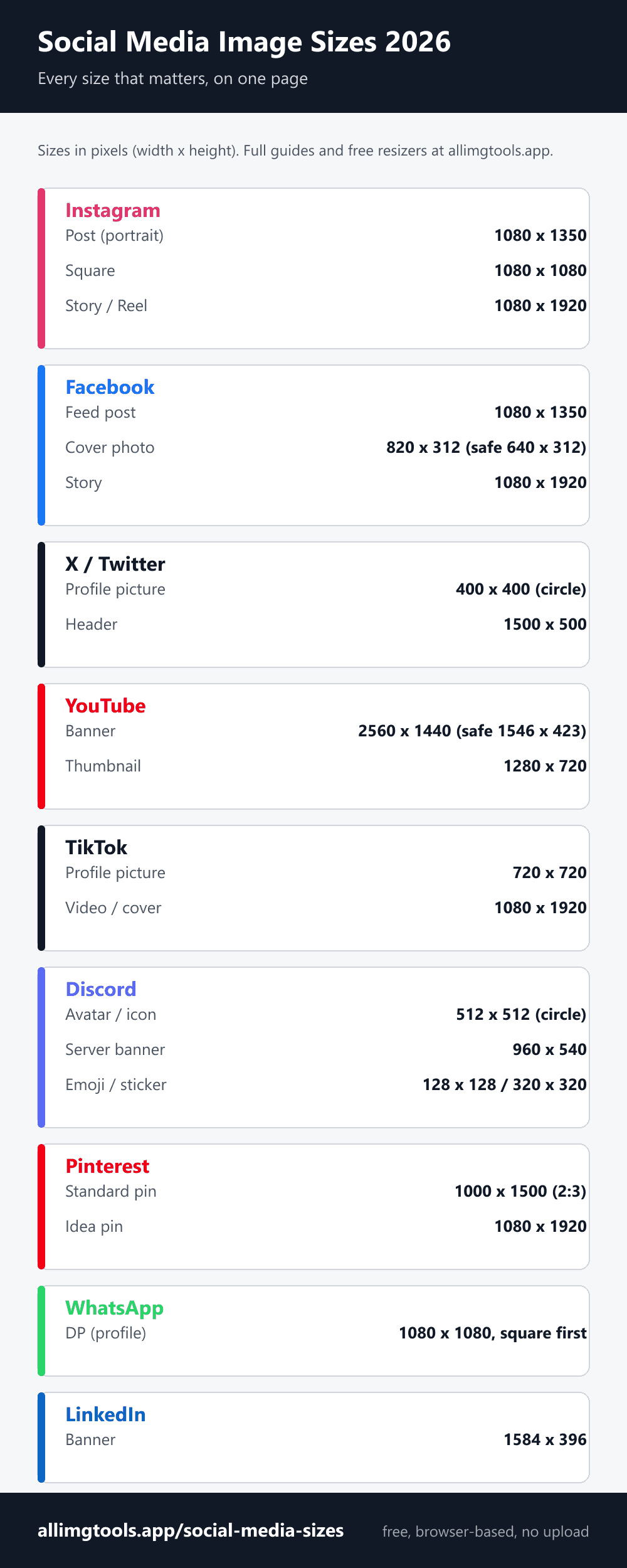
Instagram compresses every upload to 1080 wide. Anything bigger gets downscaled. Anything smaller looks soft. Match the exact dimensions before uploading.
Standard feed post. The 1:1 ratio Instagram displays cleanest.
Hit the upload size cap before Instagram does its own compression.
Pre-crop profile pictures to the circle with live preview at story / feed sizes.
The only Facebook image with two different aspect ratios. Desktop shows 820 × 312. Mobile shows 640 × 360 with about 90 pixels cropped from each side.
Includes interactive desktop-vs-mobile preview with safe-zone overlay.
newThe 4:5 portrait post that fills the most feed space. Square, landscape, and Story sizes covered too.
X (Twitter)
3 toolsProfile picture displays as a circle, so square corners get clipped. Header is 3:1 and cropped differently on mobile vs desktop. File size caps differ for static vs animated (Premium).
Resize to native 400 × 400 to avoid the upscale blur most uploads suffer from.
newWide 3:1 banner behind your profile. Avatar overlaps bottom-left; mobile trims top and bottom.
Live preview at notification (24×24), timeline (48×48), and profile (200×200) sizes.
Personal profile banner is 1584 × 396. The profile picture overlaps the bottom-left corner. Mobile crops the banner to roughly the central 60% horizontally.
YouTube
2 toolsThumbnail is 1280 × 720 (16:9). The thumbnail is the single most important asset for click-through rate. Design at 1920 × 1080 if you want maximum sharpness on Retina screens, but never below 1280 × 720.
Discord
6 toolsDiscord uses different sizes for avatars, server icons, banners, stickers, emojis, and splash screens. Each has its own file size limit and boost-level requirement. The platform with the most asset types of any social platform.
Display size is 128 × 128 but upload at 512 × 512 for Retina sharpness.
newDiscord rejects any other dimension. 500 KB max file size. PNG or APNG only.
newServer banner requires Level 2 boost. Profile banner is 600 × 240 (Nitro required).
newCustom server emoji. 256 KB max. Animated as GIF requires Level 1 boost.
Stay under Discord's 25 MB free / 50 MB Nitro Basic / 500 MB Nitro Pro upload caps.
Pre-crop with live preview at the sizes Discord actually renders.
Twitch
1 toolA Twitch channel is a set of images, not one. The profile banner is 1200 × 480, the offline screen is a separate 1920 × 1080, panels are 320 px wide, and emotes need three square sizes. Mixing them up is the most common mistake.
WhatsApp forces every profile picture into a square, then masks it into a circle. Rectangular photos lose their edges. Square it yourself first to keep your full DP without cropping.
TikTok
1 toolThe profile picture displays at 200 × 200 as a circle, but upload larger so it stays sharp. Videos and covers are vertical 9:16 at 1080 × 1920.
Pinterest is built around the tall 2:3 pin. 1000 × 1500 claims the most feed space without being cropped; pins taller than about 1:2.1 get trimmed in the feed. Idea and video pins are full-screen 1080 × 1920.
Etsy
1 toolProduct images at 2000 × 2000 minimum to enable the zoom feature buyers use to inspect items. Square format works cleanest across Etsy's grid layouts.
The four universal social media image rules
Every platform has its own sizes, but four principles work across all of them:
- Upload at native resolution, not smaller. Downscaling produces sharp results. Upscaling produces blur. Always upload at the platform's recommended size or a 2x multiple, never below.
- Use JPEG at 90%+ quality. Every platform converts to JPEG anyway. Starting from a high-quality JPEG gives the re-encoding more to work with. PNG only when transparency or sharp text edges matter.
- Keep important content in the central 70-80%. Every platform crops differently on mobile vs desktop, or in different feed contexts. The center always survives.
- Test at the smallest display size. If your design reads at 48 × 48 pixels (typical mobile timeline avatar), it works everywhere. If it requires the full 400 × 400 to be understood, redesign for legibility at small sizes.
Why platforms re-compress your uploads
Every social platform applies its own image re-encoding pipeline regardless of how you uploaded. Instagram, Facebook, X, LinkedIn, YouTube, Discord, Etsy - all of them. The reasons are bandwidth and storage cost: serving a 5 MB original to every viewer would cost the platform millions per day in CDN fees.
The platform-side re-encoding is typically JPEG at 75-85% quality, with the original re-saved at multiple resolutions for different display contexts (thumbnail, mobile, desktop, retina). Your high-quality source becomes the seed material for all these resampled versions.
Practical consequence: a heavily compressed source becomes a more heavily compressed served version. A high-quality source becomes a moderately compressed served version. The visible difference is significant on text-heavy and high-contrast images. For photographs of natural scenes, the difference is barely noticeable. Always start from high quality and let the platform do its own compression.
Frequently Asked Questions
Related guides
Phone Wallpaper Hub
iPhone + Android wallpaper sizes for every model
Circle Crop Tool
Round profile picture for any platform
Compress Image
Reduce file size before upload
HEIC to JPG
Convert iPhone photos for social upload
EXIF Remover
Strip GPS and camera data before posting
Favicon Resizer
Browser tab icons in 6 sizes